Configuring Firefox
Prerequisites:
Hardware acceleration
Fedora KDE uses Wayland by default.
Wayland session
- Go to
about:support - Ensure that “Window Protocol” is set to “wayland” - if it is not, seek further help on the PC Help Hub or elsewhere as it should be.
- Ensure “Target Frame Rate” is set to your display framerate.
- Make sure “Hardware compositing” is set to “available”
- Open
about:configand setwidget.use-xdg-desktop-portal.file-pickerto 1
X.org session
- Go to
about:support - Ensure “Target Frame Rate” is set to your display framerate.
- Make sure “Hardware compositing” is set to “available”
On non Intel GPUs, you may need to set media.ffmpeg.vaapi.enabled for hardware decoding.
The VAAPI wrapper from the previous page is required on NVIDIA hardware.
If hardware decoding is disabled with error FEATURE_HARDWARE_VIDEO_DECODING_DISABLE or FEATURE_FAILURE_VIDEO_DECODING_TEST_FAILED, make sure you’ve followed the hardware acceleration setup guide, and set media.hardware-video-decoding.force-enabled to true.
- Play a video in Firefox.
- Go to
about:support - Make sure hardware decoding is supported under “Codec Support Information”
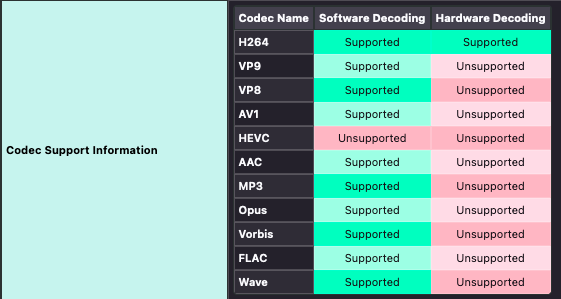
As of Firefox 137, Firefox should finally now support HEVC video. However, I haven’t had time to test it yet. Unlike the photo above, though, you should now see HEVC: Supported.